Get in touch
Java Collections Framework is a unified architecture for managing groups of objects. It simplifies programming by providing data structures and algorithms for collections, making them easier to use and manipulate.
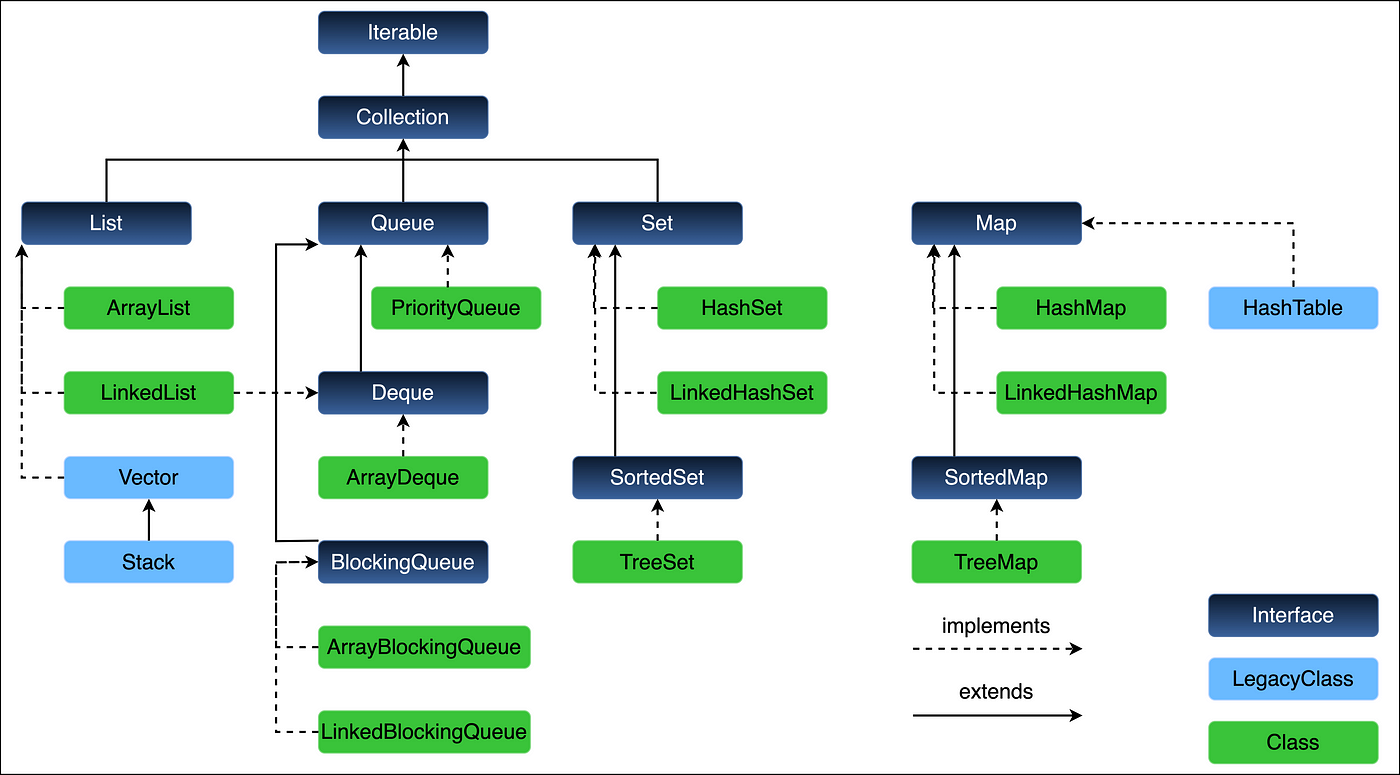

In Java, Collection is a framework that provides a set of classes and interfaces for storing and manipulating a group of objects. The Java Collections Framework (JCF) is a set of classes and interfaces that implement commonly reusable collection data structures.
Java Collections Framework provides a set of interfaces and classes for working with collections.
add(), remove(), size(), iterator(), etc.ArrayList, LinkedList, VectorHashSet, LinkedHashSet, TreeSetPriorityQueue, ArrayDequeHashMap, LinkedHashMap, TreeMap, Hashtable| Collection Type | Characteristics | Common Classes |
|---|---|---|
| List | Ordered, duplicates allowed | ArrayList, LinkedList, Vector |
| Set | No duplicates, unordered | HashSet, LinkedHashSet, TreeSet |
| Queue | FIFO or priority order | PriorityQueue, ArrayDeque |
| Map | Key-value pairs | HashMap, TreeMap, LinkedHashMap |
add(element), addAll(collection)remove(element), clear()get(index)get(key)IteratorforEach loopstream().forEach())get() method).add()/remove() operations in the middle.HashMap.HashSet due to sorting.HashMap.List<String> list = new ArrayList<>();Collections.synchronizedList() or ConcurrentHashMap.list.stream().filter(e -> e.startsWith("A")).collect(Collectors.toList());| Feature | ArrayList | LinkedList | HashSet | TreeSet |
|---|---|---|---|---|
| Ordering | Yes | Yes | No | Yes (sorted) |
| Duplicates | Yes | Yes | No | No |
| Access Speed | Fast (index) | Slow (sequential) | Fast (hash) | Slow (tree-based) |
ConcurrentModificationException if the collection is modified while iterating.CopyOnWriteArrayList allow modification during iteration.

ArrayList when frequent random access is needed.HashSet for unique, unordered collections.ConcurrentHashMap over Hashtable.TreeMap or TreeSet for sorted data.
Lets start each one
Collection InterfaceThe Collection interface in Java is part of the Java Collections Framework and represents a group of objects known as elements. It is the root interface of the framework, and all the collection types (e.g., List, Set, Queue) extend this interface, allowing them to share common methods and behaviors.
Collection Interface:Collection interface uses generics to define the type of elements it can store, e.g., Collection<T>, where T is the type of the elements.ArrayList, HashSet, etc.Set, List, Queue, etc.Collection InterfaceHere are the core methods provided by the Collection interface, along with their use cases:
boolean add(E e)List<String> names = new ArrayList<>(); names.add("John");boolean remove(Object o)names.remove("John");boolean contains(Object o)true if the collection contains the specified element.boolean exists = names.contains("John");boolean isEmpty()true if the collection is empty (contains no elements).boolean empty = names.isEmpty();int size()int count = names.size();void clear()names.clear();Object[] toArray()Object[] arr = names.toArray();boolean containsAll(Collection<?> c)true if the collection contains all elements of the specified collection.boolean hasAll = names.containsAll(otherList);boolean addAll(Collection<? extends E> c)names.addAll(otherList);boolean removeAll(Collection<?> c)names.removeAll(otherList);boolean retainAll(Collection<?> c)names.retainAll(otherList);Iterator<E> iterator()
Iterator<String> it = names.iterator();
while (it.hasNext()) {
System.out.println(it.next());
}
Collection is Given as an Interface:Collection as an interface, Java allows different types of collections (like List, Set, and Queue) to implement the same set of methods. This makes it possible to write generic code that works with any collection type.ArrayList or HashSet). You can change the underlying implementation without changing the code that uses the collection, making it more maintainable and flexible.Checking size and emptiness:
System.out.println("Size: " + names.size());
System.out.println("Is empty: " + names.isEmpty());
Removing elements:
names.remove("Bob");
Clearing all elements:
names.clear();
Iterating over the collection:
for (String name : names) {
System.out.println(name);
}
What is output of this program ?

See & tell me why this CE error. As we return type of toArray() method is Object[] right.
Updated On 08-05-2025 →
The warning shown during compilation:Note: Demo01CollectionBasics.java uses unchecked or unsafe operations. Note: Recompile with -Xlint: unchecked for details.
This is because you declared the collection as a raw Collection (without generic type <String>). You can remove the warning by declaring it like this:
Collection<String> c = new ArrayList<>();
Next →
ArrayList in Java (Short Definition)ArrayList is a part of the Java Collections Framework and implements the List interface. It is a resizable array implementation, meaning the size of the array can grow as needed to accommodate new elements. It allows duplicate elements and maintains the insertion order.
ArrayListArrayList is best suited when you need:
ArrayList is efficient.
ArrayList (Without Generics & With Generics)import java.util.ArrayList;
public class ArrayListExample {
public static void main(String[] args) {
// Creating ArrayList without generics
ArrayList list = new ArrayList();
list.add("Apple");
list.add(100);
list.add(5.5);
// Retrieving elements
for (Object element : list) {
System.out.println(element);
}
}
}
import java.util.ArrayList;
public class ArrayListExample {
public static void main(String[] args) {
// Creating ArrayList with generics
ArrayList<String> list = new ArrayList<>();
list.add("Apple");
list.add("Banana");
list.add("Cherry");
// Retrieving elements
for (String element : list) {
System.out.println(element);
}
}
}
ArrayList OperationsArrayList internally, so it takes constant time to retrieve.ArrayListpackage com.niteshsynergy.collection;
import java.util.ArrayList;
import java.util.Iterator;
import java.util.ListIterator;
public class Demo02AL {
public static void main(String[] args) {
// Using generics to avoid raw type warnings
ArrayList<String> list = new ArrayList<>();
// Adding elements to the ArrayList
list.add("A");
list.add("B");
list.add("C");
list.add("D");
list.add("E");
list.add("F");
list.add("G");
list.add("H");
list.add("I");
// Printing the ArrayList
System.out.println(list);
// 8 ways to retrieve elements from an ArrayList:
// 1. Using the get() method:
System.out.println("Using get method...");
System.out.println(list.get(1)); // Access element at index 1
// 2. Using an iterator:
System.out.println("Using Iterator...");
Iterator<String> iterator = list.iterator(); // Using generics
while (iterator.hasNext()) {
System.out.println(iterator.next());
}
// Time Complexity: O(n) - iterating through all elements
// 3. Using enhanced for loop (foreach):
System.out.println("Using enhanced for loop (foreach)...");
for (String element : list) { // No need to cast as it's a generic list
System.out.println(element);
}
// Time Complexity: O(n)
// 4. Using a ListIterator (for bi-directional iteration):
System.out.println("Using ListIterator...");
ListIterator<String> listIterator = list.listIterator(); // Using generics
while (listIterator.hasNext()) {
System.out.println(listIterator.next());
}
// Time Complexity: O(n)
// 5. Using the stream() method:
System.out.println("Using stream() method...");
list.stream().forEach(System.out::println);
// Time Complexity: O(n)
// 6. Using the forEach() method (Java 8+):
System.out.println("Using forEach() method...");
list.forEach(System.out::println);
// Time Complexity: O(n)
// 7. Using the toArray() method (convert to array):
System.out.println("Using toArray() method...");
Object[] array = list.toArray();
for (Object element : array) {
System.out.println(element);
}
// Time Complexity: O(n) for conversion and iteration
// 8. Using the for loop with index:
System.out.println("Using for loop with index...");
for (int i = 0; i < list.size(); i++) { // Corrected index range
System.out.println(list.get(i));
}
// Time Complexity: O(n) for iteration
}
}
The various ways to access elements from an ArrayList in Java offer different trade-offs in terms of flexibility, performance, and convenience. Below, I’ll explain why each of these methods exists and when they might be preferable:
get() methodget() method provides direct access to an element by its index. It’s efficient when you need to retrieve an element at a specific position quickly.Iterator interface)Iterator provides a way to iterate over the ArrayList without directly using indices. It allows you to traverse the collection in a more abstract way, particularly useful when you don't need to know the index of the current element.Iterator.remove()).for loop (foreach)for loop provides a simple and readable way to iterate through all elements in the ArrayList. It’s cleaner than using an explicit iterator in simple use cases.ListIterator extends Iterator and allows traversal of the list in both forward and backward directions. It also allows modification of the list during iteration, making it more flexible than a standard iterator.ListIterator provides extra functionality compared to a basic iterator.stream()stream() method in Java 8+ provides a functional programming approach to handle elements in a collection. It allows you to chain operations like filtering, mapping, or collecting elements in a fluent style.for loop.forEach() method (Java 8+)forEach() is a default method in Iterable that simplifies iteration. It allows you to pass a lambda expression or method reference to perform an action on each element of the ArrayList.stream(), it's a modern approach to iteration but involves lambda expressions, which can have a slight performance overhead compared to using for loops or Iterator.toArray() methodtoArray() converts the ArrayList to a plain Java array, which can be useful if you need to work with a standard array or perform operations that are easier with arrays (like accessing elements via indices in a non-List context).for loop with indexfor loop with an index is the traditional way of iterating over a collection by directly accessing elements via their index. It's very familiar and useful when you need to perform specific operations based on the index, such as comparing elements at different positions.ListIterator allows backward iteration, while toArray() allows you to convert to an array for external processing.forEach() and stream() provide a functional, declarative approach that may be easier to read, especially in complex transformations.get(), for loop) or processing elements functionally (stream(), forEach()).get()) is faster than iterating through the collection when you know the position of the element.stream()), which can make maintenance easier in complex applications.Fail-Safe vs. Fail-Fast Iterators
Fail-Fast:
ConcurrentModificationException if the collection is modified while it is being iterated over (except through the iterator itself).ArrayList uses fail-fast iterators.Example of Fail-Fast:
ArrayList<String> list = new ArrayList<>();
list.add("Apple");
Iterator<String> it = list.iterator();
list.add("Banana");
it.next(); // Throws ConcurrentModificationException
Fail-Safe:
CopyOnWriteArrayList, which create a copy of the collection for iteration, ensuring that the original collection remains unchanged during iteration.Example of Fail-Safe
CopyOnWriteArrayList<String> list = new CopyOnWriteArrayList<>();
list.add("Apple");
Iterator<String> it = list.iterator();
list.add("Banana"); // No ConcurrentModificationException
it.next();
If you want to avoid ConcurrentModificationException, you have two options:
Use an explicit synchronization mechanism like synchronized blocks to ensure no modification happens while iterating.
Use a CopyOnWriteArrayList if you expect modifications while iterating, as it supports fail-safe iterators.
Example of Synchronization:
synchronized(list) {
Iterator<String> it = list.iterator();
while (it.hasNext()) {
System.out.println(it.next());
}
}
Here’s a concise, tabular format explaining the insertion order, duplicates, and time complexities for ArrayList operations in Java:
| Property | Description | Time Complexity |
|---|---|---|
| Insertion Order | ArrayList maintains the order of insertion. The elements are retrieved in the same sequence as they were added. | O(1) for adding an element at the end of the list (amortized). |
| Duplicates | ArrayList allows duplicate elements. You can add the same element multiple times. | O(1) for adding a duplicate at the end of the list. |
| Accessing by Index | You can access any element by its index. This operation is fast because it is backed by an array. | O(1) (constant time). |
| Adding an Element | Adds an element at the end of the list. If capacity is exceeded, a new array is created. | O(1) amortized for most cases, but O(n) if resizing occurs (rare). |
| Inserting at Index | Inserts an element at a specific index. All subsequent elements are shifted to the right. | O(n) in the worst case (when inserting at the beginning). |
| Removing by Index | Removes an element at a specific index, and shifts subsequent elements to the left. | O(n) in the worst case (when removing from the beginning). |
| Removing by Object | Removes the first occurrence of the specified element, shifting subsequent elements. | O(n) because it needs to search for the element. |
| Iterating (Looping) | Iterating through the list with an iterator or enhanced for loop preserves the insertion order. | O(n) for iterating over all elements. |
ArrayList is maintained when accessed or iterated over.ArrayList allows duplicates. The same element can appear multiple times in the list.add(): Most of the time, adding an element to the end of the list is O(1). However, if the underlying array is full and needs resizing, it takes O(n) because a new array is created and all elements are copied over.get(): Accessing an element by index is a constant-time operation, i.e., O(1).
For a real-time project, using an ArrayList is common in scenarios that require maintaining insertion order and where you can have duplicates. A complex example could be a task management system that handles the following:
Imagine you're building a task management system for a project. In this system:
ArrayList to store tasks.import java.util.Date;
public class Task {
private int taskId;
private String taskName;
private Date deadline;
private int priority; // 1 = High, 2 = Medium, 3 = Low
private String assignee;
public Task(int taskId, String taskName, Date deadline, int priority, String assignee) {
this.taskId = taskId;
this.taskName = taskName;
this.deadline = deadline;
this.priority = priority;
this.assignee = assignee;
}
// Getters and Setters
public int getTaskId() { return taskId; }
public String getTaskName() { return taskName; }
public Date getDeadline() { return deadline; }
public int getPriority() { return priority; }
public String getAssignee() { return assignee; }
@Override
public String toString() {
return "Task{" +
"taskId=" + taskId +
", taskName='" + taskName + '\'' +
", deadline=" + deadline +
", priority=" + priority +
", assignee='" + assignee + '\'' +
'}';
}
}
Task Manager Class (Using ArrayList):
import java.util.ArrayList;
import java.util.List;
import java.util.Date;
public class TaskManager {
private List<Task> taskList;
public TaskManager() {
taskList = new ArrayList<>();
}
// Add a task
public void addTask(Task task) {
taskList.add(task);
}
// Remove a task by taskId
public boolean removeTaskById(int taskId) {
for (Task task : taskList) {
if (task.getTaskId() == taskId) {
taskList.remove(task);
return true;
}
}
return false;
}
// Search task by priority
public List<Task> getTasksByPriority(int priority) {
List<Task> result = new ArrayList<>();
for (Task task : taskList) {
if (task.getPriority() == priority) {
result.add(task);
}
}
return result;
}
// Update task deadline
public void updateTaskDeadline(int taskId, Date newDeadline) {
for (Task task : taskList) {
if (task.getTaskId() == taskId) {
task.setDeadline(newDeadline);
break;
}
}
}
// Get all tasks assigned to a specific assignee
public List<Task> getTasksForAssignee(String assignee) {
List<Task> result = new ArrayList<>();
for (Task task : taskList) {
if (task.getAssignee().equals(assignee)) {
result.add(task);
}
}
return result;
}
// Display all tasks
public void displayTasks() {
for (Task task : taskList) {
System.out.println(task);
}
}
}
Main Class (Running the Task Manager):
import java.util.Date;
public class TaskManagerApp {
public static void main(String[] args) {
// Creating TaskManager instance
TaskManager taskManager = new TaskManager();
// Adding tasks to the manager
taskManager.addTask(new Task(1, "Design Database", new Date(), 1, "John"));
taskManager.addTask(new Task(2, "Develop API", new Date(), 2, "Sarah"));
taskManager.addTask(new Task(3, "Create UI", new Date(), 3, "Michael"));
taskManager.addTask(new Task(4, "Test Application", new Date(), 1, "John"));
// Display all tasks
System.out.println("All Tasks:");
taskManager.displayTasks();
// Remove a task
taskManager.removeTaskById(2);
// Display tasks after removal
System.out.println("\nTasks After Removal:");
taskManager.displayTasks();
// Get tasks with high priority
System.out.println("\nHigh Priority Tasks:");
taskManager.getTasksByPriority(1).forEach(System.out::println);
// Update task deadline
taskManager.updateTaskDeadline(3, new Date(System.currentTimeMillis() + 86400000)); // 1 day later
// Display updated task
System.out.println("\nUpdated Task 3:");
taskManager.displayTasks();
// Get tasks for a specific assignee
System.out.println("\nTasks assigned to John:");
taskManager.getTasksForAssignee("John").forEach(System.out::println);
}
}
The ArrayList<E> class in Java is an implementation of the List<E> interface, and it extends AbstractList<E>, implementing several other interfaces like RandomAccess, Cloneable, and Serializable. Let’s break down the purpose of each of these interfaces and how they benefit the ArrayList class.
List<E> InterfaceArrayList implements the List<E> interface, which defines methods to manage a collection of elements in a specific order.ArrayList follows the List contract.RandomAccess InterfaceRandomAccess interface is a marker interface that indicates that the list supports fast, constant-time access to elements by index.ArrayList:ArrayList provides fast O(1) time complexity for element access via the get(int index) and set(int index, E element) methods. This is because it is backed by a dynamic array.RandomAccess, algorithms or utilities can take advantage of this feature to optimize performance. For example, methods like Collections.sort() can optimize their sorting algorithms for RandomAccess collections.ArrayList didn’t implement RandomAccess, performance might degrade when iterating over large lists or when trying to access elements directly by index, compared to an implementation like LinkedList, which doesn't offer fast random access.Cloneable InterfaceCloneable interface allows for creating a copy of the ArrayList using the clone() method.ArrayList:Cloneable, the ArrayList can provide a shallow copy of the list (i.e., copying the array but not the individual objects themselves).ArrayList<E> clone = (ArrayList<E>) originalList.clone();ArrayList: It makes it easier to duplicate the list if needed for parallel processing, backup purposes, or when working with independent collections that share the same elements initially.Serializable InterfaceSerializable interface marks the ArrayList as serializable, meaning instances of ArrayList can be converted into a byte stream, and this byte stream can be stored (e.g., in a file) or transmitted over a network.ArrayList:ArrayList and save its state to a file or send it over a network. When deserialized, the list can be restored to its original form.FileOutputStream fos = new FileOutputStream("list.ser");
ObjectOutputStream oos = new ObjectOutputStream(fos);
oos.writeObject(myArrayList); // Serializing
Why it helps ArrayList: Serialization is key in systems where objects need to be saved or transmitted. By implementing Serializable, ArrayList can be part of these systems.
ArrayList Implement These Interfaces?Efficiency and Versatility:
RandomAccess ensures that ArrayList can handle indexing efficiently, which is a key operation in many algorithms.Cloneable makes it easier to duplicate the list when needed.Serializable enables storing and transferring the list's state.These features are meant to make ArrayList a general-purpose, efficient, and flexible data structure, capable of performing a wide variety of tasks while being easy to use in complex systems where performance, duplication, or communication across JVMs is necessary.
ArrayList not only provides the core functionality expected from a list (such as element management) but also improves its utility in real-world applications, offering performance optimizations (via RandomAccess), making it easy to duplicate (via Cloneable), and ensuring compatibility with systems that need to store or transmit objects (via Serializable). These features align with common use cases like object persistence, network communication, and performance-critical applications.Here’s a real-time code example demonstrating how Cloneable helps ArrayList by allowing you to create a shallow copy of an ArrayList. This can be useful when you want to create a new list that has the same elements as the original but without modifying the original list.
Imagine you're building a shopping cart system for an e-commerce website. You want to clone the items in a cart before applying a discount or modifying some of the items, so you don't affect the original cart.
import java.util.ArrayList;
class Product {
String name;
double price;
// Constructor
public Product(String name, double price) {
this.name = name;
this.price = price;
}
// Method to display product info
public void display() {
System.out.println("Product: " + name + ", Price: " + price);
}
}
public class ShoppingCart {
public static void main(String[] args) {
// Create an ArrayList to hold products in a shopping cart
ArrayList<Product> cart = new ArrayList<>();
cart.add(new Product("Laptop", 1000.00));
cart.add(new Product("Phone", 500.00));
cart.add(new Product("Headphones", 150.00));
// Display the original cart
System.out.println("Original Cart:");
for (Product product : cart) {
product.display();
}
// Clone the cart using the clone() method
ArrayList<Product> clonedCart = (ArrayList<Product>) cart.clone();
// Modify the cloned cart (apply a discount on the cloned cart)
clonedCart.get(0).price = 900.00; // Discount applied on the Laptop
// Display the modified cloned cart
System.out.println("\nCloned Cart (after applying discount):");
for (Product product : clonedCart) {
product.display();
}
// Display the original cart again to show that it was not affected
System.out.println("\nOriginal Cart after modification:");
for (Product product : cart) {
product.display();
}
}
}
Product class representing an item in the cart with a name and price.ShoppingCart class, we create an ArrayList<Product> to represent the cart.cart.clone() method is used to clone the original shopping cart. This creates a new list with the same elements.clonedCart.get(0).price = 900.00), but since it's a shallow copy, the original cart remains unaffected.clone() creates a shallow copy, meaning the Product objects themselves are not duplicated; the references to the same Product objects are copied. Therefore, changes to the properties of the objects inside the clonedCart will not affect the original cart object.
Vector is a legacy class in Java that implements the List interface, just like ArrayList. It is part of the java.util package and was introduced before ArrayList.ArrayList is not synchronized by default, Vector is synchronized, making it thread-safe (but at the cost of performance).Vector grows dynamically as needed. By default, it increases its size by doubling the capacity when it runs out of space.ArrayList.Vector are synchronized by default, which ensures thread safety but can cause performance overhead in single-threaded scenarios.| Operation | Time Complexity |
|---|---|
| Add an element (at the end) | O(1) (amortized), but O(n) when resizing occurs. |
| Add an element (at any index) | O(n) (due to shifting elements) |
| Get an element by index | O(1) |
| Remove an element by index | O(n) (due to shifting elements) |
| Remove an element by object | O(n) (due to searching) |
| Iterating | O(n) |
9 ways to retrieve elements from a Vector:
package com.niteshsynergy.collection;
import java.util.ArrayList;
import java.util.Iterator;
import java.util.ListIterator;
import java.util.Vector;
import java.util.Enumeration;
public class Demo02Vector {
public static void main(String[] args) {
// Using generics for type safety
Vector<String> vector = new Vector<>();
// Adding elements to the Vector
vector.add("A");
vector.add("B");
vector.add("C");
vector.add("D");
vector.add("E");
vector.add("F");
vector.add("G");
vector.add("H");
vector.add("I");
// Printing the Vector
System.out.println("Vector elements: " + vector);
// 9 ways to retrieve elements from a Vector:
// 1. Using the get() method:
System.out.println("Using get method...");
System.out.println(vector.get(1)); // Access element at index 1
// 2. Using an iterator:
System.out.println("Using Iterator...");
Iterator<String> iterator = vector.iterator(); // Using generics
while (iterator.hasNext()) {
System.out.println(iterator.next());
}
// Time Complexity: O(n)
// 3. Using enhanced for loop (foreach):
System.out.println("Using enhanced for loop (foreach)...");
for (String element : vector) { // No need to cast as it's a generic list
System.out.println(element);
}
// Time Complexity: O(n)
// 4. Using a ListIterator (for bi-directional iteration):
System.out.println("Using ListIterator...");
ListIterator<String> listIterator = vector.listIterator(); // Using generics
while (listIterator.hasNext()) {
System.out.println(listIterator.next());
}
// Time Complexity: O(n)
// 5. Using the stream() method:
System.out.println("Using stream() method...");
vector.stream().forEach(System.out::println);
// Time Complexity: O(n)
// 6. Using the forEach() method (Java 8+):
System.out.println("Using forEach() method...");
vector.forEach(System.out::println);
// Time Complexity: O(n)
// 7. Using the toArray() method (convert to array):
System.out.println("Using toArray() method...");
Object[] array = vector.toArray();
for (Object element : array) {
System.out.println(element);
}
// Time Complexity: O(n) for conversion and iteration
// 8. Using the for loop with index:
System.out.println("Using for loop with index...");
for (int i = 0; i < vector.size(); i++) {
System.out.println(vector.get(i));
}
// Time Complexity: O(n)
// 9. Using Enumeration (specific to Vector):
System.out.println("Using Enumeration...");
Enumeration<String> enumeration = vector.elements(); // Vector's specific method to get Enumeration
while (enumeration.hasMoreElements()) {
System.out.println(enumeration.nextElement());
}
// Time Complexity: O(n)
}
}
ArrayList and Vector is that Vector is synchronized by default, which makes it thread-safe but slower than ArrayList for single-threaded applications.Vector doubles its size when it reaches capacity, while ArrayList increases its size by 50% by default.Let’s create a real-world example similar to the task manager we did for ArrayList, but this time using Vector. Since Vector is thread-safe, it might be useful in scenarios where multiple threads need to interact with the same list of tasks concurrently.
Vector (Thread-Safe)
import java.util.*;
class Task {
private int taskId;
private String taskName;
private String assignee;
public Task(int taskId, String taskName, String assignee) {
this.taskId = taskId;
this.taskName = taskName;
this.assignee = assignee;
}
public int getTaskId() { return taskId; }
public String getTaskName() { return taskName; }
public String getAssignee() { return assignee; }
@Override
public String toString() {
return "Task{" + "taskId=" + taskId + ", taskName='" + taskName + '\'' + ", assignee='" + assignee + '\'' + '}';
}
}
public class TaskManagerWithVector {
private Vector<Task> taskList;
public TaskManagerWithVector() {
taskList = new Vector<>();
}
// Add a task
public void addTask(Task task) {
taskList.add(task);
}
// Remove a task by taskId
public boolean removeTaskById(int taskId) {
for (Task task : taskList) {
if (task.getTaskId() == taskId) {
taskList.remove(task);
return true;
}
}
return false;
}
// Search task by assignee
public List<Task> getTasksForAssignee(String assignee) {
List<Task> result = new ArrayList<>();
for (Task task : taskList) {
if (task.getAssignee().equals(assignee)) {
result.add(task);
}
}
return result;
}
// Display all tasks
public void displayTasks() {
for (Task task : taskList) {
System.out.println(task);
}
}
}
class Main {
public static void main(String[] args) {
TaskManagerWithVector taskManager = new TaskManagerWithVector();
// Adding tasks to the manager
taskManager.addTask(new Task(1, "Design Database", "John"));
taskManager.addTask(new Task(2, "Develop API", "Sarah"));
taskManager.addTask(new Task(3, "Create UI", "Michael"));
taskManager.addTask(new Task(4, "Test Application", "John"));
// Display all tasks
System.out.println("All Tasks:");
taskManager.displayTasks();
// Remove a task by ID
taskManager.removeTaskById(2);
System.out.println("\nAfter Removing Task with ID 2:");
taskManager.displayTasks();
// Get tasks for assignee "John"
System.out.println("\nTasks assigned to John:");
taskManager.getTasksForAssignee("John").forEach(System.out::println);
}
}
taskId, taskName, and assignee.Vector<Task> to store tasks.Vector is synchronized, it ensures that tasks are added and removed safely when accessed by different threads, but it may incur performance overhead in a single-threaded application due to synchronization.Vector provides a quick solution.Vector is a legacy class, it might be used in legacy systems where refactoring to newer collections like CopyOnWriteArrayList is impractical.
Vector is thread-safe and preserves the insertion order, making it a good choice in multi-threaded applications where synchronization is required.ArrayList might be a better choice because it offers better performance.ArrayList, Vector allows duplicates and can dynamically resize, but at the cost of performance due to synchronization.If you are building a high-performance application where thread-safety is not a concern, it’s often better to use ArrayList instead of Vector. If you need thread-safety and don’t want to manually manage synchronization, Vector can be a good choice, but modern alternatives like CopyOnWriteArrayList or Collections.synchronizedList() are often preferred.
Stack is a legacy class in Java that represents a last-in-first-out (LIFO) stack of objects. It extends Vector and implements the List interface, so it has similar properties to Vector, but with additional stack-specific methods like push, pop, peek, etc.Vector, Stack is synchronized by default, making it thread-safe, but also potentially slower in single-threaded contexts due to the overhead of synchronization.Stack is often used when you need to keep track of method calls, undo operations, or parsing expressions (like in calculators or compilers).| Operation | Time Complexity |
|---|---|
| Push (Add an element) | O(1) |
| Pop (Remove an element) | O(1) |
| Peek (View top element) | O(1) |
| Search | O(n) (linear search for element) |
9 ways to retrieve elements from a Stack:
package com.niteshsynergy.collection;
import java.util.ArrayList;
import java.util.Iterator;
import java.util.ListIterator;
import java.util.Stack;
import java.util.Enumeration;
public class Demo02Stack {
public static void main(String[] args) {
// Using generics for type safety
Stack<String> stack = new Stack<>();
// Adding elements to the Stack
stack.push("A");
stack.push("B");
stack.push("C");
stack.push("D");
stack.push("E");
stack.push("F");
stack.push("G");
stack.push("H");
stack.push("I");
// Printing the Stack
System.out.println("Stack elements: " + stack);
// 9 ways to retrieve elements from a Stack:
// 1. Using the peek() method:
System.out.println("Using peek method...");
System.out.println(stack.peek()); // Access top element without removing it
// 2. Using pop() method:
System.out.println("Using pop method...");
System.out.println(stack.pop()); // Access and remove top element
// 3. Using an iterator:
System.out.println("Using Iterator...");
Iterator<String> iterator = stack.iterator(); // Using generics
while (iterator.hasNext()) {
System.out.println(iterator.next());
}
// Time Complexity: O(n)
// 4. Using enhanced for loop (foreach):
System.out.println("Using enhanced for loop (foreach)...");
for (String element : stack) { // No need to cast as it's a generic list
System.out.println(element);
}
// Time Complexity: O(n)
// 5. Using a ListIterator (for bi-directional iteration):
System.out.println("Using ListIterator...");
ListIterator<String> listIterator = stack.listIterator(); // Using generics
while (listIterator.hasNext()) {
System.out.println(listIterator.next());
}
// Time Complexity: O(n)
// 6. Using the stream() method:
System.out.println("Using stream() method...");
stack.stream().forEach(System.out::println);
// Time Complexity: O(n)
// 7. Using the forEach() method (Java 8+):
System.out.println("Using forEach() method...");
stack.forEach(System.out::println);
// Time Complexity: O(n)
// 8. Using the toArray() method (convert to array):
System.out.println("Using toArray() method...");
Object[] array = stack.toArray();
for (Object element : array) {
System.out.println(element);
}
// Time Complexity: O(n) for conversion and iteration
// 9. Using Enumeration (specific to Stack):
System.out.println("Using Enumeration...");
Enumeration<String> enumeration = stack.elements(); // Stack's specific method to get Enumeration
while (enumeration.hasMoreElements()) {
System.out.println(enumeration.nextElement());
}
// Time Complexity: O(n)
}
}
We can implement a real-world example of a Undo Mechanism using a Stack. This is a typical use case for a Stack, where each action performed (e.g., editing text) is pushed onto the stack, and you can pop the last action to undo it.
import java.util.*;
class Action {
private String actionName;
private String data;
public Action(String actionName, String data) {
this.actionName = actionName;
this.data = data;
}
@Override
public String toString() {
return "Action{" + "actionName='" + actionName + '\'' + ", data='" + data + '\'' + '}';
}
}
public class UndoManager {
private Stack<Action> undoStack;
private Stack<Action> redoStack;
public UndoManager() {
undoStack = new Stack<>();
redoStack = new Stack<>();
}
// Perform an action and push it onto the undo stack
public void performAction(String actionName, String data) {
Action action = new Action(actionName, data);
undoStack.push(action);
System.out.println("Performed: " + action);
// Clear redo stack after a new action
redoStack.clear();
}
// Undo the last action
public void undo() {
if (!undoStack.isEmpty()) {
Action lastAction = undoStack.pop();
redoStack.push(lastAction);
System.out.println("Undone: " + lastAction);
} else {
System.out.println("No actions to undo.");
}
}
// Redo the last undone action
public void redo() {
if (!redoStack.isEmpty()) {
Action lastUndoneAction = redoStack.pop();
undoStack.push(lastUndoneAction);
System.out.println("Redone: " + lastUndoneAction);
} else {
System.out.println("No actions to redo.");
}
}
// Display the current actions in the undo stack
public void displayActions() {
System.out.println("\nCurrent Actions (Undo Stack):");
for (Action action : undoStack) {
System.out.println(action);
}
}
}
class Main {
public static void main(String[] args) {
UndoManager undoManager = new UndoManager();
// Perform some actions
undoManager.performAction("Edit Text", "Added a paragraph.");
undoManager.performAction("Delete Text", "Deleted a paragraph.");
undoManager.performAction("Format Text", "Bolded a paragraph.");
// Display actions in the undo stack
undoManager.displayActions();
// Undo an action
undoManager.undo();
// Display actions after undo
undoManager.displayActions();
// Redo an action
undoManager.redo();
// Display actions after redo
undoManager.displayActions();
}
}
actionName and data to describe what was done (e.g., editing text).undoStack for actions that can be undone and redoStack for actions that have been undone but can be redone.performAction method adds an action to the undoStack.undo method pops the most recent action from the undoStack and pushes it onto the redoStack.redo method pops the most recent undone action from the redoStack and pushes it back onto the undoStack.Stack (due to its synchronization) may introduce unnecessary performance overhead. For single-threaded environments, a simple ArrayList or LinkedList may be more efficient.Stack, and you are building a modern application, Deque (Double-ended Queue) or ArrayDeque is often recommended for stack-like operations because they provide better performance.
Stack is useful in scenarios where LIFO (Last In First Out) behavior is needed, such as undo/redo functionality, parsing, and recursive method calls.ArrayDeque or LinkedList in non-concurrent contexts.Stack can efficiently handle operations that need to be undone or redone, maintaining a history of actions and providing simple management of them.
LinkedList in Java is part of the java.util package and implements the List interface. Unlike an ArrayList, it stores elements in nodes where each node points to the next node, creating a linked structure. It supports operations such as insertion and deletion at both ends of the list.LinkedList is not synchronized, meaning it is not thread-safe by default. You would need to use external synchronization if multiple threads are involved.LinkedList is useful when you need to frequently add or remove elements, particularly when these operations are expected to happen at the beginning or end of the list, as it performs better than ArrayList in these cases.
| Operation | Time Complexity |
|---|---|
| Add First (Insert at beginning) | O(1) |
| Add Last (Insert at end) | O(1) |
| Remove First | O(1) |
| Remove Last | O(1) |
| Get (Access element) | O(n) |
| Remove (Access and remove an element) | O(n) |
8 ways to retrieve elements from a LinkedList:
package com.niteshsynergy.collection;
import java.util.LinkedList;
import java.util.Iterator;
public class Demo03LinkedList {
public static void main(String[] args) {
// Create a LinkedList of Strings
LinkedList<String> list = new LinkedList<>();
// Add elements to the LinkedList
list.add("A");
list.add("B");
list.add("C");
list.add("D");
list.add("E");
// Printing the LinkedList
System.out.println("LinkedList elements: " + list);
// 8 ways to retrieve elements from a LinkedList:
// 1. Using the get() method:
System.out.println("Using get() method...");
System.out.println(list.get(2)); // Access the element at index 2
// 2. Using iterator():
System.out.println("Using Iterator...");
Iterator<String> iterator = list.iterator();
while (iterator.hasNext()) {
System.out.println(iterator.next());
}
// 3. Using for-each loop:
System.out.println("Using enhanced for loop...");
for (String element : list) {
System.out.println(element);
}
// 4. Using listIterator():
System.out.println("Using ListIterator...");
var listIterator = list.listIterator();
while (listIterator.hasNext()) {
System.out.println(listIterator.next());
}
// 5. Using stream() method:
System.out.println("Using stream() method...");
list.stream().forEach(System.out::println);
// 6. Using forEach() method:
System.out.println("Using forEach() method...");
list.forEach(System.out::println);
// 7. Using toArray():
System.out.println("Using toArray() method...");
Object[] array = list.toArray();
for (Object element : array) {
System.out.println(element);
}
// 8. Using descendingIterator() for reverse order:
System.out.println("Using descendingIterator() for reverse order...");
var descendingIterator = list.descendingIterator();
while (descendingIterator.hasNext()) {
System.out.println(descendingIterator.next());
}
}
}
In this case, a LinkedList can be used to track changes in an editor, where each change is added to the list, and actions can be undone by removing elements from the list.
import java.util.*;
class Action {
private String actionName;
private String data;
public Action(String actionName, String data) {
this.actionName = actionName;
this.data = data;
}
@Override
public String toString() {
return "Action{" + "actionName='" + actionName + '\'' + ", data='" + data + '\'' + '}';
}
}
public class UndoManager {
private LinkedList<Action> actionHistory;
public UndoManager() {
actionHistory = new LinkedList<>();
}
// Perform an action
public void performAction(String actionName, String data) {
Action action = new Action(actionName, data);
actionHistory.add(action);
System.out.println("Performed: " + action);
}
// Undo the last action
public void undo() {
if (!actionHistory.isEmpty()) {
Action lastAction = actionHistory.removeLast();
System.out.println("Undone: " + lastAction);
} else {
System.out.println("No actions to undo.");
}
}
// Display actions
public void displayActions() {
System.out.println("\nCurrent Actions:");
for (Action action : actionHistory) {
System.out.println(action);
}
}
}
class Main {
public static void main(String[] args) {
UndoManager undoManager = new UndoManager();
// Perform some actions
undoManager.performAction("Edit Text", "Added a paragraph.");
undoManager.performAction("Delete Text", "Deleted a paragraph.");
undoManager.performAction("Format Text", "Bolded a paragraph.");
// Display actions
undoManager.displayActions();
// Undo an action
undoManager.undo();
// Display actions after undo
undoManager.displayActions();
}
}
In this example, the LinkedList allows us to perform actions (like editing text) and keep a history. The removeLast() method efficiently removes the most recent action for the undo functionality.
list.get(index)), an ArrayList is often more efficient due to its random access capability (O(1) time complexity).ArrayList.